
Running CheXagent Locally: a VLM on a MacBook
Have you heard about Draft Reporting and Vison Language Models (VLMs) but thought it required a GPU cluster? The models are more approachable than ever, if you have a modern MacBook you try it there.
In this guide, we'll use Gradio to build a local web interface for CheXagent, Stanford AIMI's 3-billion parameter vision-language model trained specifically for radiology report generation. The result: upload a chest X-ray, get structured findings in seconds.
CheXagent is a research model. Always consult a qualified radiologist for clinical interpretation.
What You'll Build
Upload a chest X-ray, get findings like this:
Lungs and Airways:
- Complete collapse of the right lung
- Left lung is clear

Pleura:
- Large right pneumothorax

Cardiovascular:
- Mild leftward shift of the mediastinum

Tubes, Catheters, and Support Devices:
- Endotracheal tube in place, terminating 3.5 cm above the carina
- Left internal jugular central venous catheter terminating in the upper SVC
- Enteric tube coursing below the diaphragm, tip not visualized

Musculoskeletal and Chest Wall:
- No acute osseous abnormalities
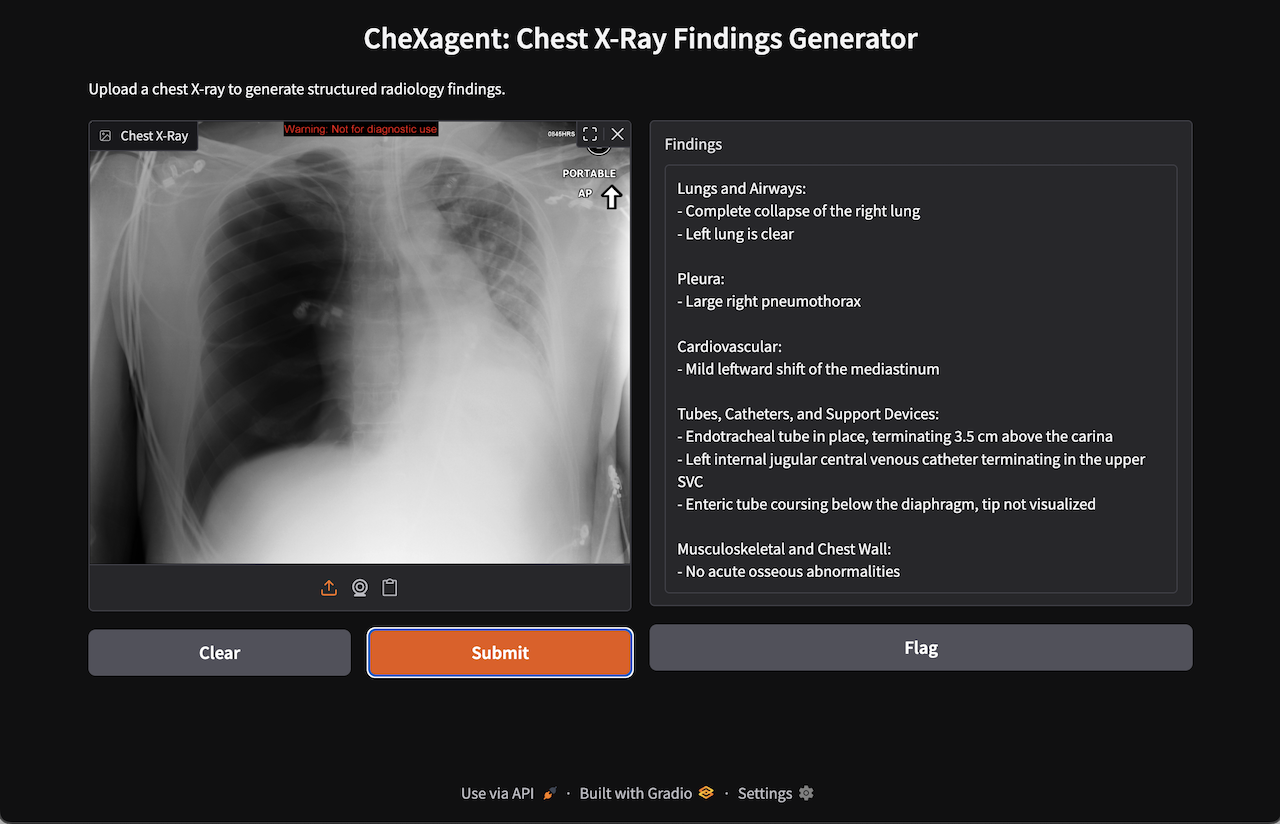
Case courtesy of Andrew Ho, Radiopaedia.org. From the case rID: 23278
Requirements
- Apple Silicon Mac (M1/M2/M3/M4/M5) with 16GB+ unified memory
- macOS 13+ (Ventura or later)
First run downloads ~6GB of model weights from HuggingFace Hub.
Critical: Pin transformers to 4.39.0
The model will silently break with newer transformers versions.
Versions 4.44+ cause CheXagent to return generic, clinically useless findings ("The lungs are unremarkable") instead of detecting actual pathologies. This is a library compatibility issue with how newer transformers handles vision-language models with custom code—the model weights are fine, but the inference pipeline breaks.
Pin to 4.39.0 or you'll spend hours debugging phantom issues.
Setup
mkdir chexagent-local && cd chexagent-local

# Install uv if needed
curl -LsSf https://astral.sh/uv/install.sh | sh

# Initialize project with Python 3.12
uv init --python 3.12
Install dependencies:
# Core ML
uv add torch torchvision
uv add "transformers==4.39.0"  # CRITICAL: Do not upgrade
uv add accelerate

# Gradio UI
uv add gradio

# Image processing (required by model's custom code)
uv add opencv-python Pillow

# Vision-language model dependencies
uv add timm einops sentencepiece "protobuf>=3.20,<5.0"
uv add pyarrow ftfy regex

# Required by model's custom HuggingFace code (imported at load time)
uv add matplotlib albumentations
The App
Save as app.py:
"""CheXagent Gradio interface for chest X-ray findings generation."""

import gradio as gr
import torch
from transformers import AutoModelForCausalLM, AutoTokenizer

MODEL_ID = "StanfordAIMI/CheXagent-2-3b-srrg-findings"
MODEL_REVISION = "d18fab171a51e6e6a3f9d313f608b999bcdeb75a"  # Pin for reproducibility
PROMPT = "Structured Radiology Report Generation for Findings Section"


DEVICE = "mps" if torch.backends.mps.is_available() else "cpu"

print(f"Loading model on {DEVICE}...")
print("(First run downloads ~6GB of model weights)")

tokenizer = AutoTokenizer.from_pretrained(
    MODEL_ID, revision=MODEL_REVISION, trust_remote_code=True
)
model = AutoModelForCausalLM.from_pretrained(
    MODEL_ID,
    revision=MODEL_REVISION,
    device_map="auto",
    trust_remote_code=True,
).eval()

print("Model loaded!")


def generate_findings(image_path: str) -> str:
    """Generate radiology findings from a chest X-ray image."""
    if image_path is None:
        return "Please upload an image."

    query = tokenizer.from_list_format([
        {"image": image_path},
        {"text": PROMPT}
    ])

    conversation = [
        {"from": "system", "value": "You are a helpful assistant."},
        {"from": "human", "value": query},
    ]

    input_ids = tokenizer.apply_chat_template(
        conversation, add_generation_prompt=True, return_tensors="pt"
    )

    with torch.inference_mode():
        output_ids = model.generate(
            input_ids.to(DEVICE),
            do_sample=False,
            max_new_tokens=512,
            use_cache=True,
            pad_token_id=tokenizer.eos_token_id,
        )[0]

    return tokenizer.decode(
        output_ids[input_ids.size(1):-1], skip_special_tokens=True
    )


demo = gr.Interface(
    fn=generate_findings,
    inputs=gr.Image(type="filepath", label="Chest X-Ray"),
    outputs=gr.Textbox(label="Findings", lines=10),
    title="CheXagent: Chest X-Ray Findings Generator",
    description="Upload a chest X-ray to generate structured radiology findings.",
)

if __name__ == "__main__":
    demo.launch()
Run It
uv run python app.py
Open http://localhost:7860 in your browser. Upload a chest X-ray and click Submit.
Performance:
- First inference after startup: 30-60 seconds (model warmup)
- Subsequent inferences: 15-30 seconds on Apple M4
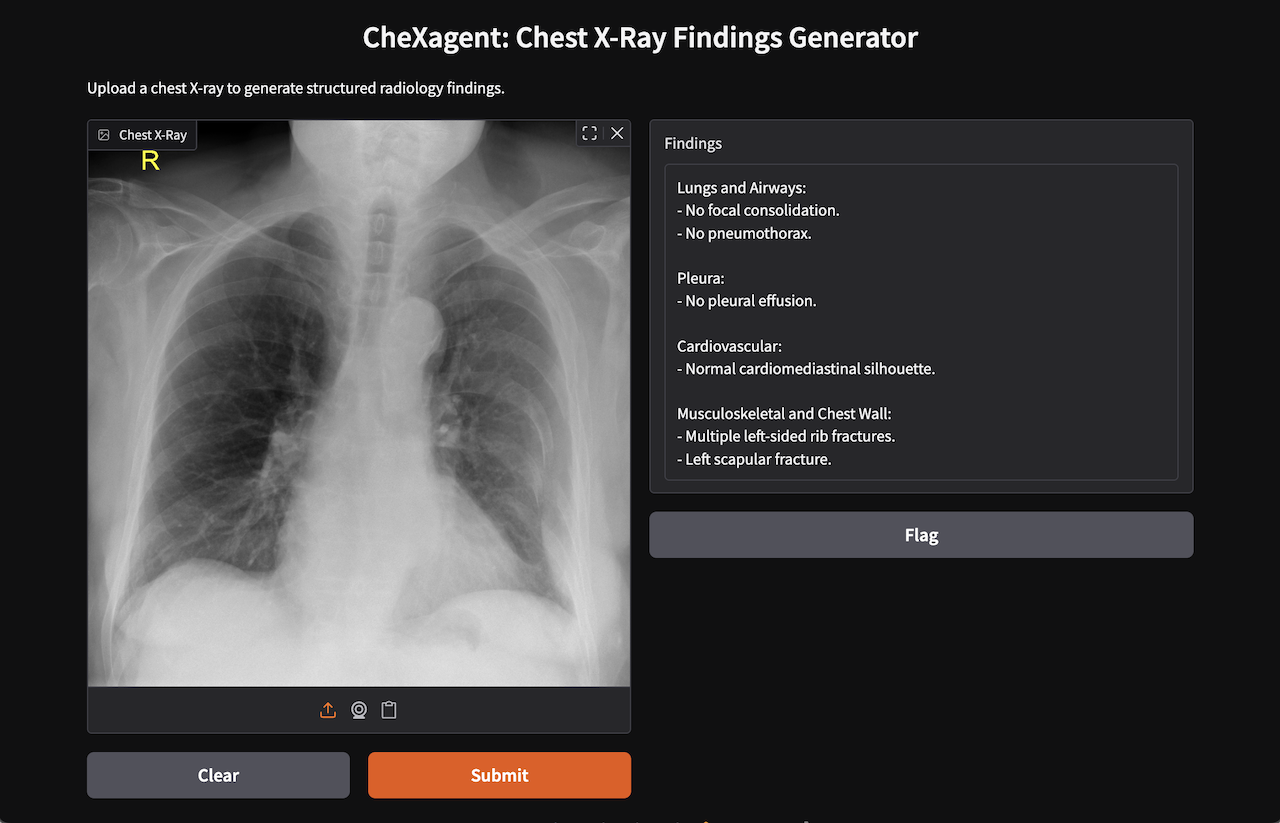
Case courtesy of Henry Knipe, Radiopaedia.org. From the case rID: 31240
Troubleshooting
"mutex lock failed" on macOS: TensorFlow conflict with Metal. Uninstall it:
uv pip uninstall tensorflow tensorflow-macos
Generic/vague findings: Wrong transformers version. Verify you're on 4.39.0:
uv run python -c "import transformers; print(transformers.__version__)"
# Must print: 4.39.0
If it prints anything else, force reinstall:
uv add "transformers==4.39.0" --reinstall
Out of memory: Close other applications. 16GB Macs should handle the 3B model comfortably, but if you're tight on memory, quit browsers and other heavy apps before running.
Not on a Mac? This guide targets Apple Silicon, but the model runs on NVIDIA GPUs and CPU-only machines too. Change device_map and consider setting torch_dtype explicitly for your hardware. See the HuggingFace model card for details.
What's Next?
You just ran Stanford's vision-language model on commodity hardware. Two years ago, this required a specialized GPU.
In the LinkedIn Comments, let me know what you're interested in next:
- Avoid the Dreaded "Wall of Text" - learn how Presto integrates AI into your workflow today.
- Fine-tune VLM models - how to use a base model like chexagent-srrg and fine-tune.
- Process DICOM studies - converting DICOM to model-ready format has a few tricks.
- Compare models - try swapping in other vision-language models to compare output quality.
Resources: